For a small managed IT services provider, a new enquiry competes with every client ticket in the inbox. Someone has to notice it, decide whether it’s worth a call, and then actually send the invitation, and each of those handoffs is a chance for a lead to go cold.
The goal was to cut those handoffs down without taking the decision away from a person.
How it works.
- An enquiry arrives in SharePoint from the website form.
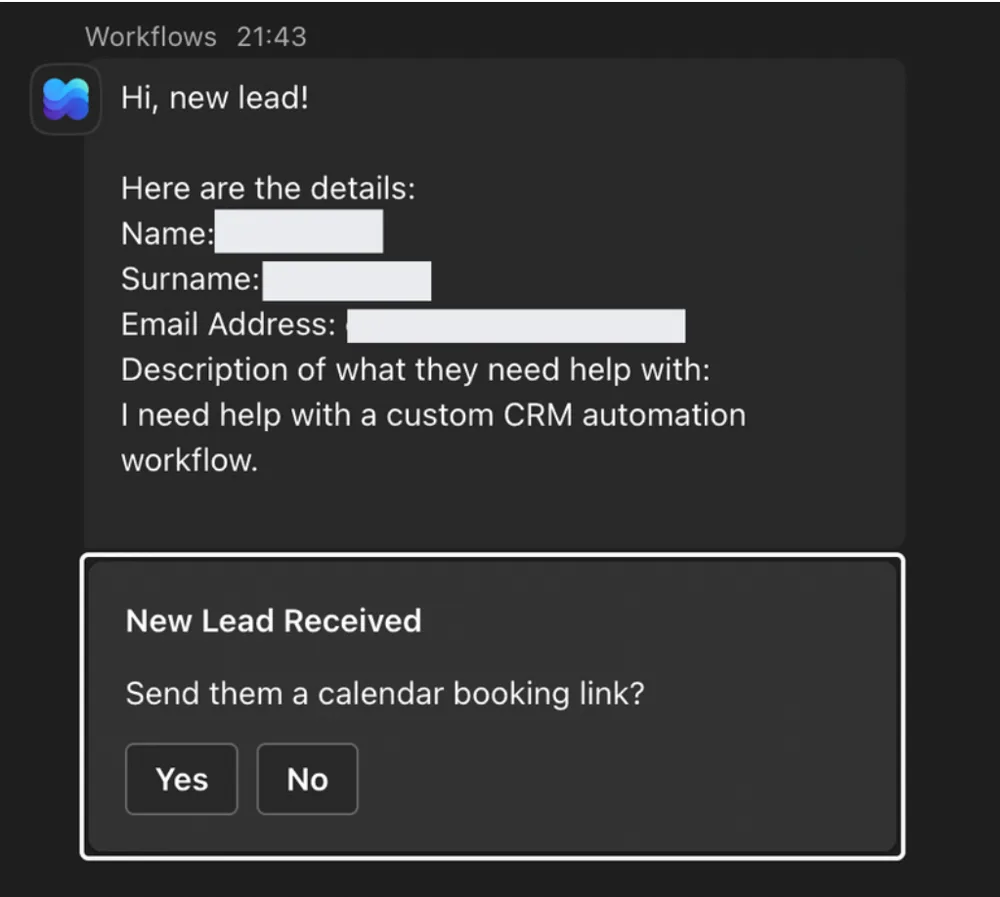
- Power Automate posts it to Teams through the Flow bot, with the person’s name, email address and what they need help with.
- An Adaptive Card asks one question: “Send them a calendar booking link?”, with Yes and No buttons.
- Yes sends the prospect a personal email with the Microsoft Bookings link. It thanks them for getting in touch, explains that the call is a Teams meeting, and tells them they’ll get a confirmation and a reminder the day before.
- No ends the flow, so spam and poor fits never get an email.
Why keep a human in the loop.
It would have been easy to send every enquiry a booking link automatically. But not every form submission deserves a call, and a founder’s calendar is the scarcest thing in a small MSP. The flow does the repetitive parts, gathering the details, posting them where the team already works and writing the email, and leaves the one decision that matters to a person, who makes it with a single click from wherever they are in Teams.
The result.
New enquiries show up in Teams instead of waiting in an inbox, and the path from “this looks good” to a booking invitation is one click. I didn’t measure response times or how many leads went on to book, so I won’t put a number on it, but the handoffs that used to slow it down are gone.
“Amazing, fantastic work.”